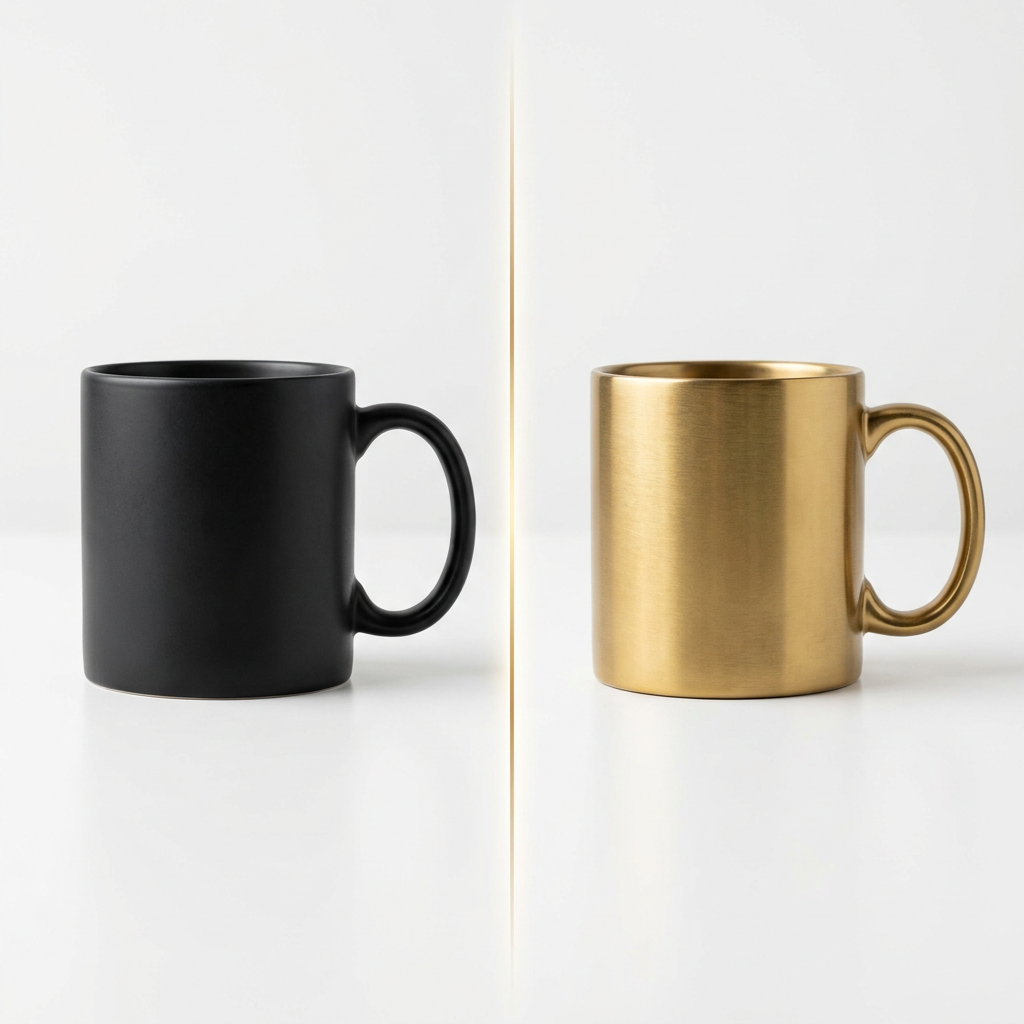
The product photographer had 47 shots to edit. Same setup, same lighting — but the client had changed the product color from matte black to brushed gold three days after the shoot. Reshooting was not in the budget. Manually masking and repainting each mug in Photoshop would take two days. She typed "replace the matte black mug with a brushed gold version, same reflections" and was done in twenty minutes.
AI object swap is the technology that lets you replace any object, element, or region in a photo or video using a text description — without manual selection tools, layer masks, or Photoshop expertise. Unlike face swap (which targets a specific biometric subject), AI object swap works on anything: furniture, clothing, skies, product colors, background elements, vehicles, and more.
As of 2026, AI object swap has moved from a feature buried in advanced editing software to a one-click capability available in browser-based tools accessible to any creator. Understanding what it can and cannot do will save you significant time on your next project.
How AI Object Swap Actually Works
Object swap uses three layers of AI working in sequence.
Semantic segmentation is the first layer. The AI reads the image and draws invisible boundaries around every recognizable region — the chair, the table, the window, the person in the background. Think of it like Google Maps drawing neighborhood boundaries: the AI doesn't trace your cursor; it reads visual context and infers where one thing ends and another begins. Point at the chair, and the AI already knows the exact pixels that belong to it.
Inpainting is the second layer. Once the object is segmented, the AI removes it from the image and reconstructs the underlying surface — filling in the wall behind the painting, the grass beneath the car, the desk surface under the lamp. Without this step, swapping an object would leave a visible void rather than a natural replacement.
Generative replacement is the third layer. The AI synthesizes a new object that matches your text description, then composites it into the space using the lighting, shadow angle, and perspective of the original image. Modern diffusion models (the same family powering image generators like Midjourney and Stable Diffusion) handle this step, which is why the outputs now look physically plausible rather than pasted.
The quality of the final result depends heavily on how well the segmentation layer identified the target region and how much visual context the inpainting model has to work with. A lamp on an empty desk is easy; a partially obscured object against a complex background is harder.
The Creative Use Cases That Actually Matter
E-commerce teams use AI object swap at production scale. Instead of reshooting a product in six colorways, shoot once and swap the color. Instead of arranging fifteen lifestyle scenes for fifteen product variants, build one scene and swap the product. According to a 2024 report by McKinsey & Company, brands that integrated AI-powered image editing into their production workflows reduced per-asset costs by 30–45% on average in pilot programs. Object swap is one of the primary techniques driving those savings.
Interior designers and real estate marketers use it to stage properties without physical furniture — swapping an empty room's bare floor for hardwood, replacing dated fixtures with modern ones, or showing a space in multiple style configurations from a single photograph. Virtual staging powered by AI object swap has replaced traditional physical staging in an estimated 38% of US real estate listings as of 2025, according to the National Association of Realtors' annual technology survey.
Fashion and apparel brands use object swap for catalog localization — swapping a jacket color for regional market preferences, or replacing accessories to match different seasonal collections without reshooting the look.
Film and advertising production teams use it for continuity fixes: correcting a branded prop that shouldn't appear in a rival's ad, removing a coffee cup from the corner of a shot, or replacing a generic background element with a branded one in post. A task that once required a compositing artist's full afternoon now takes minutes.
Content creators and social media managers use it for quick creative pivots — changing the background scene of an already-edited video, swapping the color of a product featured in a reel, or replacing an outdated UI screenshot with a current one inside a tutorial video.
AI Object Swap Tools Worth Knowing (April 2026)
| Tool | Best For | Object Swap Method | Video Support | Free Tier |
|---|---|---|---|---|
| Adobe Firefly (Photoshop) | Professional photo editing | Generative Fill (brush + prompt) | No | Yes (25 credits/mo) |
| PixVerse | Video object + background swap | Keyframe control via prompt | Yes | 90+60 credits/day |
| Photocat AI Replace | Quick e-commerce object swap | Text prompt + auto-segment | No | Limited |
| fal.ai (Flux Kontext) | Developer API, text-to-edit | Natural language instruction | No | Credits |
| Picsart | Social creative editing | Brush mask + prompt | No | Limited |
| ChatGPT (GPT Image 2) | Text-driven image editing | Conversational instruction | No | Yes (within ChatGPT Plus) |
| Runway | Video inpainting + object removal | Brush mask | Yes | 125 credits/mo |
Verified April 2026.
How Framia's Intelligent Canvas Changes the Object Swap Workflow
For creators who work across both photo and video assets — and need the result of an object swap to feed directly into a longer production — the challenge isn't just the swap itself. It's everything that happens around it.
Framia.pro is built around an intelligent canvas that connects AI image editing, video generation, and design agents in a single workspace. The canvas is designed around a simple interaction model: point to what you want changed, describe the change, and the agent handles the rest. For object-level edits, this means you're not context-switching between a swap tool, a video editor, and an image compositor — the editing stays connected to the production.
The practical value shows up clearly in ad production: swap a product color in the hero image, and then directly use that edited image as a reference frame when generating a video ad from the same canvas. The object change propagates through the asset chain rather than requiring a new export-and-reimport cycle at each step. For a solo creator producing a product campaign or for a small team building recurring branded content, that connected workflow is where production time is actually saved.
A 5-Step Object Swap Workflow for Creators
Step 1: Prepare a high-resolution source image. Resolution matters because the segmentation model needs enough pixel data to accurately identify boundaries. Images below 1024×1024 pixels often produce imprecise edge detection, especially on small or textured objects.
Step 2: Write a precise replacement prompt. Vague prompts produce vague results. "Replace the bag with a leather bag" is weaker than "Replace the canvas tote bag with a dark brown full-grain leather shoulder bag, same perspective and studio lighting." Include the material, color, style, and any specific visual attributes you want the replacement to match.
Step 3: Check the segmentation mask before generating. Most professional tools show you the selected region before running the replacement. If the mask bleeds into background elements or misses part of the target object, adjust it manually before proceeding. Fixing the mask takes 10 seconds; fixing a bad output takes much longer.
Step 4: Evaluate lighting and shadow consistency. The AI will attempt to match the lighting of the original scene, but it sometimes miscalculates shadow direction or reflection intensity. For product photography, this is the most common failure point — a replacement object that looks geometrically correct but lit incorrectly. If the result looks off, add shadow direction to your prompt ("cast shadow falling left, consistent with natural window light from the right").
Step 5: Run a final edge review. Zoom to 200% around the swap boundary. Look for halo artifacts, unnatural color bleed, or surface texture that doesn't match the surrounding image. These are most visible at edges and are often correctable with a generation re-run with a tighter mask.
Object Swap vs. Object Removal vs. Face Swap
These three terms overlap but describe different operations.
Object removal erases an element from the image and fills the space with a plausible background reconstruction. There's no replacement — just a clean removal. Use this to eliminate unwanted elements: cables, signage, crowd members in the background.
Object swap removes one element and replaces it with a new one specified by a text prompt. The AI generates the replacement to match scene lighting and perspective. Use this when you want to change what something looks like without changing its location in the frame.
Face swap is a specialized form of object swap targeting human faces, using additional identity-matching steps to preserve the source person's specific likeness rather than generating a generic replacement. Face swap tools are purpose-built for this task and outperform general object swap tools on face-specific work.
For most e-commerce and creative production use cases, AI object swap is the right tool. For identity-preserving people content — de-aging, talent replacement, character consistency — dedicated face swap tools handle the task with more precision.
FAQ
What is AI object swap and how is it different from Photoshop editing?
AI object swap uses machine learning to automatically segment, remove, and replace any object in an image based on a text description — without manual selection tools, layer masks, or skilled hand work. Traditional Photoshop editing requires manually drawing selections, managing layers, and blending replacements by hand, which can take hours. AI object swap completes the same task in seconds. The trade-off is control: Photoshop gives a skilled editor precise pixel-level control; AI object swap delivers fast, good-enough results with less precision at the edges.
What kinds of objects can AI object swap handle well?
AI object swap performs best on clearly bounded, well-lit objects against relatively simple backgrounds: products, furniture, clothing, vehicles, signage, and background scene elements. It struggles with objects that have intricate, hard-to-segment boundaries — dense foliage, translucent glass, fine hair — and with objects that are partially occluded or deeply overlapping with other elements in the scene.
Can AI object swap work on video, not just photos?
Yes, though video object swap is significantly more complex than photo swap because the replacement must stay consistent across frames as the camera moves, the object moves, and lighting changes. Tools like PixVerse and Runway support video object inpainting and replacement, using frame-tracking to maintain consistency. Results are best on short clips with relatively static scenes; fast-moving objects or complex background motion will stress any current video swap system.
How accurate are AI object swap results for e-commerce product photography?
For standard product photography — clean background, even studio lighting, front-facing object — modern tools can produce commercially usable results in most cases. A 2024 analysis by the e-commerce production platform Pixelbin found that AI object swap achieved acceptable quality for catalog use (without manual touch-up) approximately 72% of the time on standard product shots. Results on lifestyle photography with complex backgrounds or non-standard lighting are lower, typically requiring manual refinement on 40–60% of outputs.
What is the best prompt format for AI object swap?
The most reliable prompt format includes four elements: (1) the object being replaced ("Replace the white ceramic mug"), (2) the replacement object with specific material and color ("with a brushed copper travel mug"), (3) the style or finish ("with a matte finish"), and (4) the lighting context ("matching the soft overhead studio light in the original image"). Adding shadow direction and reflection detail when relevant — especially for reflective materials — significantly improves result consistency.
The photographer with 47 shots to fix finished her afternoon in the time it once would have taken her to finish three. That time compression is what AI object swap actually delivers at its current capability level — not perfection, but a 10× speed multiplier on a class of edits that previously required either professional retouching skills or a full day's work. For creators who want that capability embedded in a broader production environment rather than as a standalone tool, Framia.pro is built specifically around that kind of connected creative workflow.