
Select the image you wish to edit from your device to open it in the Framia Pro workspace.
Use the Brush tool to paint over the part of the image you want to modify. In the prompt box, describe what you want the AI to generate in the selected area.
Hit "Generate" to see the magic happen. Preview the results, make any necessary tweaks to your mask, and click the download icon to save your high-resolution image.
Framia Pro's AI inpainting offers fast, seamless edits with intelligent blending. Transform images through simple brush and prompt actions in seconds.
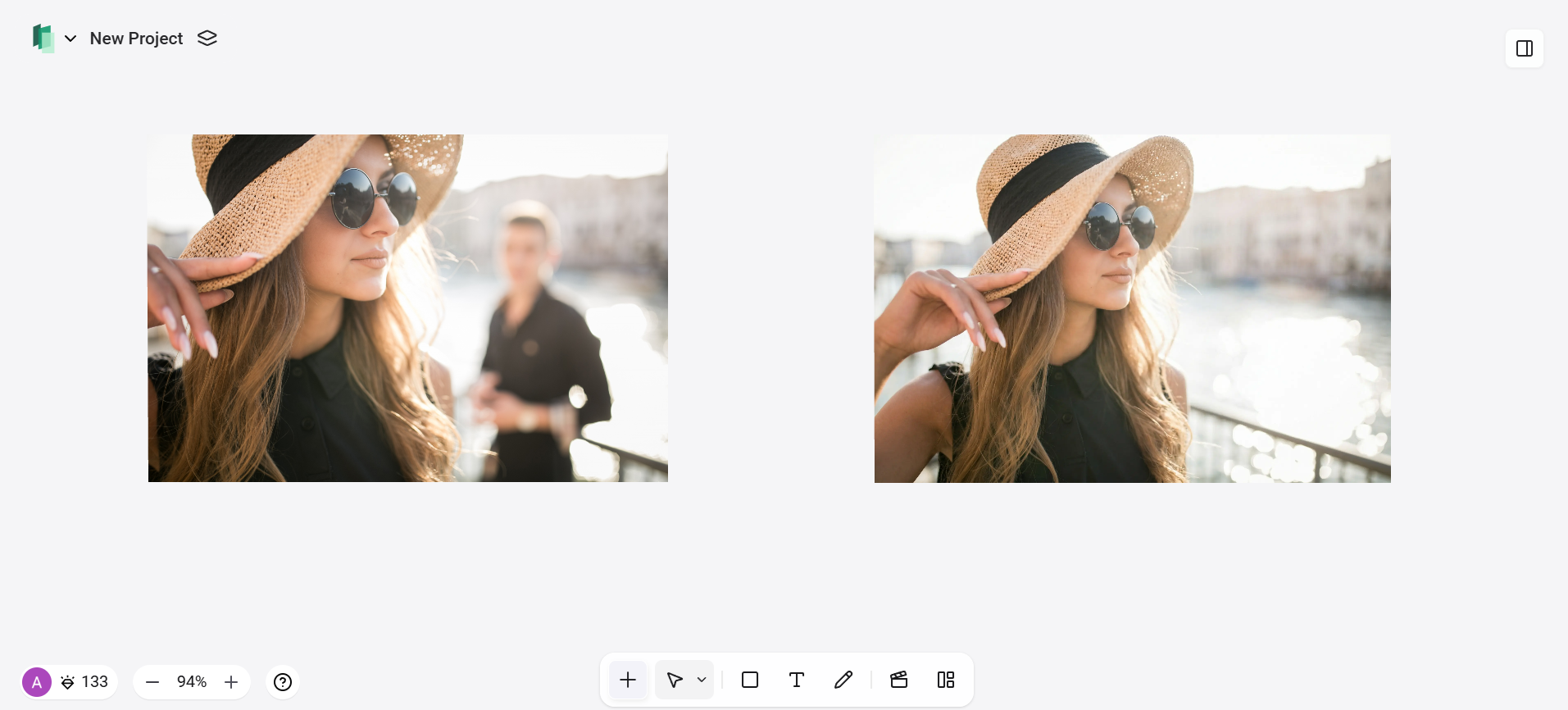
Framia Pro's AI inpainting provides a seamless solution for object removal, allowing you to erase photobombers, background clutter, watermarks, or remove people from photo backgrounds instantly. The tool intelligently fills removed areas without artifacts. Perfect for travel photos, product images, or family portraits, results look seamless, clean, and professional—no manual touch-ups or editing skills required.
With Framia Pro, you can transform any part of your image by simply describing what you want to see. Mask an area and use text prompts to replace objects, change outfits, alter backgrounds, or change hair color in photo naturally without harsh edges or artificial tones. The AI blends new elements seamlessly, enabling precise redesigns and creative changes with professional-quality results.
Achieve studio-quality face retouch results while preserving the subject’s unique, authentic features. It removes acne, blemishes, wrinkles, scars, and uneven skin tone without over-smoothing or artificial effects. Ideal for selfies, headshots, and portraits, the AI enhances confidence and clarity while keeping facial features authentic, flattering, and true to the original subject.
Editing text in photos is simple and effective with Framia Pro's inpainting AI technology. Easily mask and remove unwanted watermarks, captions, logos, or signs, then replace them with new text or branded elements using intuitive prompts. Perfect for cleaning up memes, screenshots, marketing materials, and any content needing seamless text integration or removal.
As a comprehensive Design Agent, Framia Pro supports your entire creative workflow with AI inpainting free access. Beyond inpainting, you can generate visuals from scratch, split layers transform AI-generated designs into fully editable layers. Move, resize, and customize every element, and animate designs into dynamic videos. High-end features like the background remover and image upscaler ensure every project is polished and ready for professional distribution.
Framia Pro combines simplicity, speed, and pro-level quality in a browser. Start free and unlock endless creativity.
Framia Pro's free AI image inpainting offers a cost-effective workflow by eliminating expensive reshoots, wardrobe changes, or location scouting. Swap objects, backgrounds, clothing, or scenes instantly with text prompts, saving professional production costs.
AI inpainting replaces hours of manual editing with seconds of generation. Natural language prompts eliminate complex masking and layers, enabling rapid iterations, faster approvals, and consistent output for tight deadlines.
Stay on the creative edge with 20+ up-to-date models like Nano Banana Pro and Midjourney v7. One subscription rules them all, delivering professional results without falling behind.
Framia Pro delivers photorealistic results using advanced AI that perfectly matches lighting, shadows, textures, skin tones, and environment. Face swaps, outfit changes, and background replacements look natural, polished, and professional.
Designed for beginners and professionals alike, Framia Pro works directly in your browser. No downloads or design knowledge needed—upload an image, mask the area, describe the change, and generate instantly.
From quick fixes to full creative projects, Framia Pro handles every scenario with unlimited potential and zero restrictions.
Prompt: Remove the person standing in the background on the right, natural lighting.
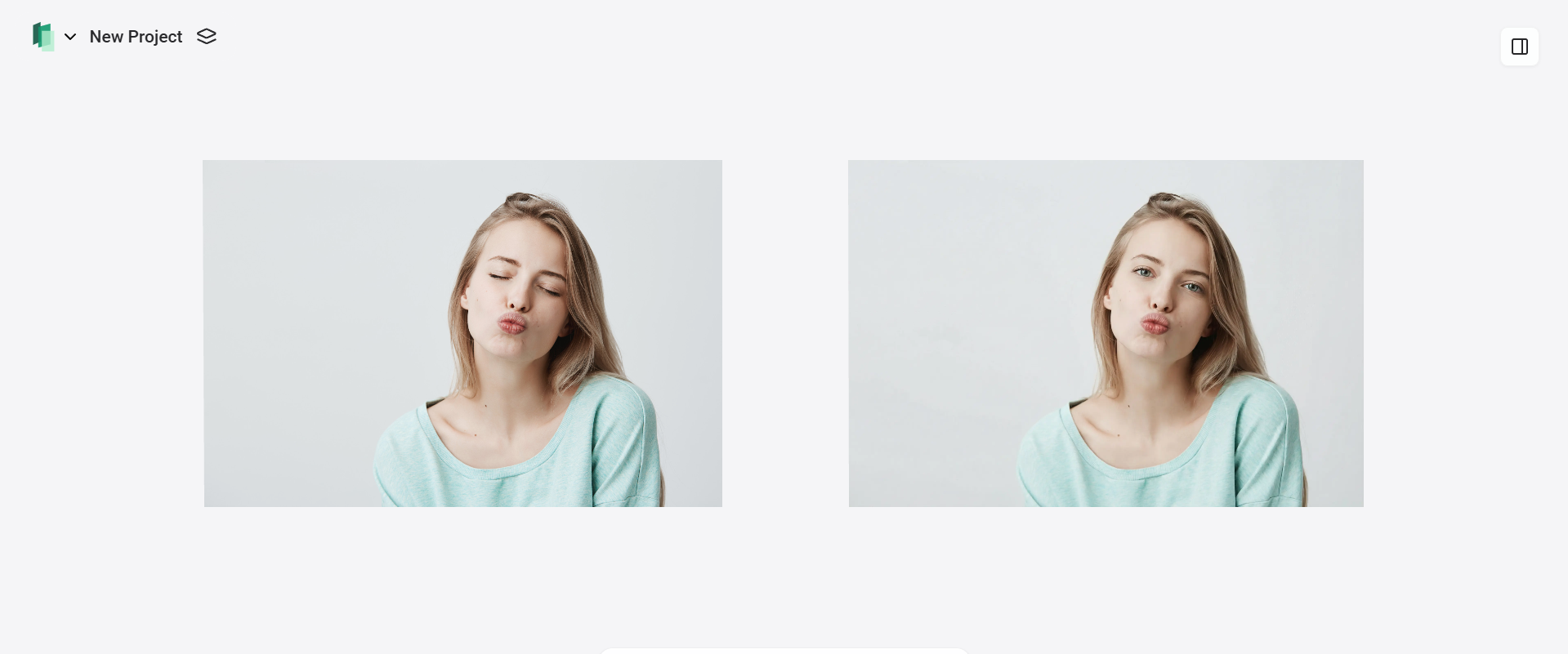
Prompt: Open the subject's closed eyes naturally, as if mid-blink turning into a relaxed open gaze. Keep exact same facial features, expression, skin texture, tone, pores, subtle imperfections, lighting direction and shadows, eye color, iris details, and overall realism.
Prompt: Smooth skin, remove acne, blemishes, black spots, and minor wrinkles, keep natural skin texture and realistic look, no over-smoothing.
Prompt: Add a classic black baseball cap on the person's head, realistic fit and fabric texture, brim slightly curved, matching the existing lighting direction and shadows on the face, natural hair peeking out underneath if visible, seamless blend with skin and hair, no distortion, photorealistic.
Replace the current outfit with an elegant white blazer and black pants, modern tailored fit, realistic fabric texture, lighting, and shadows matching the pose.
Prompt: Replace the background with a clean white studio seamless backdrop, soft even lighting, no shadows or objects, professional product photography style, high resolution, sharp focus on the camera.
Freelance Writer
Framia Pro surprised me—the interface is so straightforward that even without any design background, I could jump right in. I can effortlessly remove people from photo backgrounds or fix small imperfections by simply brushing the area and typing a prompt. Being able to regenerate instantly until it's perfect, plus free high-res downloads, has completely changed how I handle visuals for articles and social content.
Commercial Photographer
"As someone who works with pro tools all day, I didn't expect to be impressed—but Framia Pro delivers surprisingly clean, fast image inpainting and creative variations. It's ideal for quick client previews, testing alternate looks, or fixing small issues on set like removing a distracting reflection. No installation, instant results, and completely free to start—it fits right into my professional workflow."
E-commerce Founder
"This tool saved me so much time on product photography. I used to bounce between multiple apps to fix lighting or remove distractions, but now I can perform a seamless face retouch or background swap in one place. The prompt system and quick previews let me test styles fast without wasting hours. For anyone running a small business, Framia Pro is a real lifesaver.
Student
"I expected complex AI editing to have a steep learning curve, but this platform proved the opposite. The process is incredibly intuitive: you just upload your file, select the area to change, and watch the results appear without needing a single tutorial. The variety of available models gives me the flexibility I need for my projects, and the instant templates prevent me from getting stuck during the creative process."
UI/UX Designer
"Framia Pro's inpainting is a game-changer for my workflow. I frequently need to remove distractions, swap elements, or fix small details in mockups and client visuals without losing context or quality. The masking is precise, prompts are intuitive, and the AI blends lighting, shadows, and textures so naturally that edits look hand-done. No more jumping to Photoshop for quick fixes — it's fast, browser-based, and free to start. I regenerate a few times until it's pixel-perfect. For any designer who wants professional inpainting without the hassle, Framia Pro delivers."
Content Creator & YouTuber
"Framia Pro has become essential for my thumbnails and video stills. The inpainting lets me remove unwanted background noise, add text overlays, or completely change scenes in seconds — all while keeping consistent lighting and style across my brand. I especially love how it handles detailed prompts like 'add dramatic lighting with cinematic feel' without artifacts. Free to start, super fast generation, and the ability to iterate quickly means I can experiment with ideas on the fly and post better content faster. It's like having an instant creative partner."