
01.
Download File
Click the download button above. Your browser will save the .zip package locally.
Version: 1.0.4 [Stable]
Size: 66 KB
Compatibility: Chromium / Edge / Arc / Brave
Notice: Offline install required due to network policy.
Click the download button above. Your browser will save the .zip package locally.
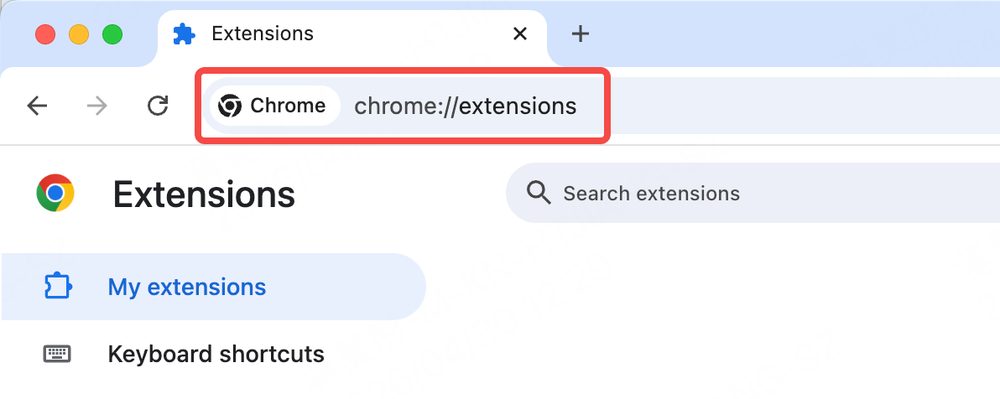
Open in your browser address bar, then enable in the top-right corner.

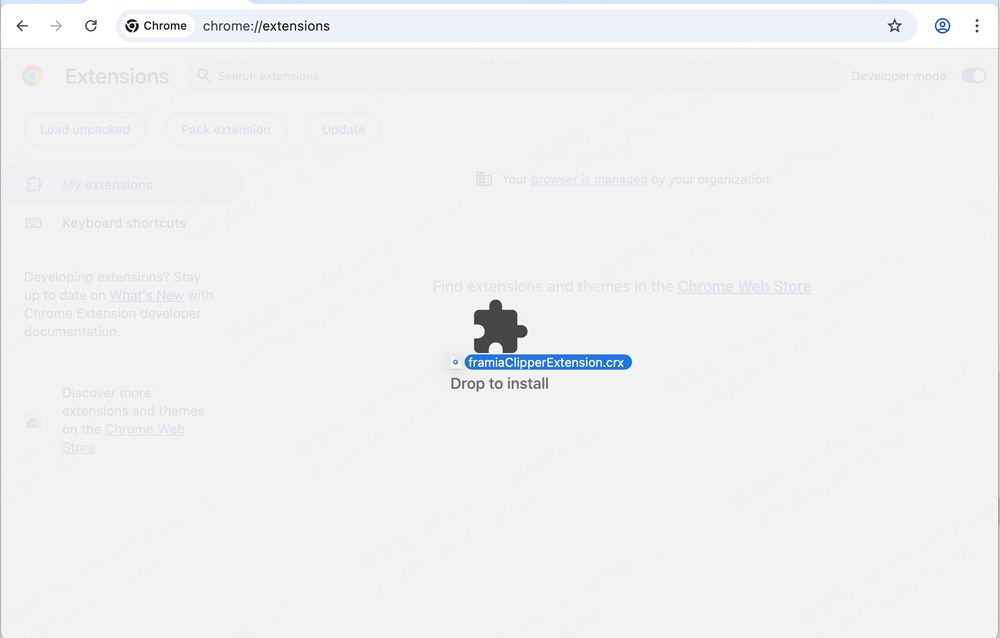
Drag and drop the downloaded .zip file directly onto the extensions page, then confirm to add the extension.
Plugin Features
Everything you need to go from scattered inspiration to polished creation — without leaving your browser.
Start CreatingSave any visual inspiration from any webpage in one click. Images, screenshots, design references — all flow directly into your Framia library.
Point at any AI-generated image and instantly extract the underlying prompt. Understand what makes great visuals tick and replicate the style.
Summon Framia's creative agent directly from your browser. Pass inspiration images, tweak prompts, and generate new visuals — without switching tabs.
One plan. 20+ most up-to-date AI models for video, image, music, and more.
Framia Plugin is built as the browser-side entry point to a full creative AI system. When you save an image, you're not just filing it away — you're feeding it into a workflow that can analyze, remix, and generate from it. The plugin understands context, extracts prompts, and hands off directly to Framia's agents with zero friction.
Most creative tools ask you to start inside them. Framia Plugin meets you where inspiration actually lives — anywhere on the web.
Compiled from the most common questions. Can't find what you're looking for? Contact us.
Q: Which browsers does the Framia Plugin support?
The plugin is available for Chromium-based browsers (Chrome, Edge, Brave, Arc) and Safari. Download the corresponding version from this page and follow the offline installation steps.
Q: Why does the plugin require offline installation instead of the Chrome Web Store?
Due to regional network policies, the extension may not be directly available via the Web Store in some areas. The offline .crx package is functionally identical to the published version and is safe to install via Developer Mode.
Q: Does the plugin collect or upload my browsing history?
No. The plugin only acts when you explicitly trigger it (e.g., clicking "Capture" or "Analyze"). It does not run in the background, does not track pages you visit, and does not upload any data without your action.
Q: Do I need a Framia account to use the plugin?
Capturing and saving inspirations works without an account. However, to use Prompt Decode, call agents, or sync your library across devices, you'll need to be logged in to your Framia account.
Q: What are Credits and how do I use them?
Credits are the universal "creative energy" on Framia. Every action — generating an image, a voiceover, or a 4K commercial video — consumes credits based on the complexity of the model used. The plugin's Prompt Decode feature also uses a small number of credits per analysis.
Q: Do credits in subscription plans expire every month?
Yes. Monthly credits reset at the end of each billing cycle. We recommend fully utilizing them before the month ends. Daily check-in credits (10/day) are also valid only on the day claimed and do not carry over.
Q: How are credits handled when I upgrade from Basic to Pro?
Upgrading is seamless — you only pay a prorated difference for the remaining days. Once confirmed, your previous credits are replaced and the full Pro credit balance is granted immediately.
Q: Why is there such a big difference in credit consumption between models?
Different models require different compute depending on quality, duration, resolution, and consistency. We continuously optimize pricing based on capability and user experience — please refer to the estimate shown in-product before running a generation.
Q: Does using 4K Upscale cost extra credits?
Yes. 4K Upscale adds extra compute (detail enhancement / repainting), so it consumes additional credits on top of the base cost. The premium varies by model and task type.
Q: Can I use content generated via the plugin for commercial purposes?
Commercial usage depends on your plan and our latest Content Usage Policy. Free plans are for personal learning and sharing only. Paid plans may allow partial or full commercial use as specified. You are responsible for ensuring your use complies with applicable laws, platform rules, and third-party rights.
Q: What if I run out of credits?
You can purchase extra top-up credit packs at any time in your personal center, or upgrade to a higher-tier plan for a lower cost-per-credit.
Q: Will credits be refunded if a generation fails?
Yes. If a generation fails due to system fluctuations or technical glitches, credits are automatically refunded in real-time. You can check the details in your credit history after refreshing.
Q: How do I contact support?
Email us at support@framia.pro or join our Discord community for real-time help from the team and other creators.
Framia Subscription
Use Framia to analyze, generate and refine creative assets — all from your browser.
Billed monthly. Renews at $20/month
For Beginners & ExplorersBilled monthly. Renews at $32.49/month
For Serious CreatorsUnlock elite models like Sora 2 and Veo 3.1 with advanced camera control. The perfect balance for high-efficiency creators.
Billed monthly. Renews at $247.71/month
For Pros & Creators10,000+ credits to redefine your limits. Get early access to new models and priority processing.